Gemini Enhancer
Powerful browser enhancements designed to streamline your digital workflow and maximize productivity.
Enhance Your Browser
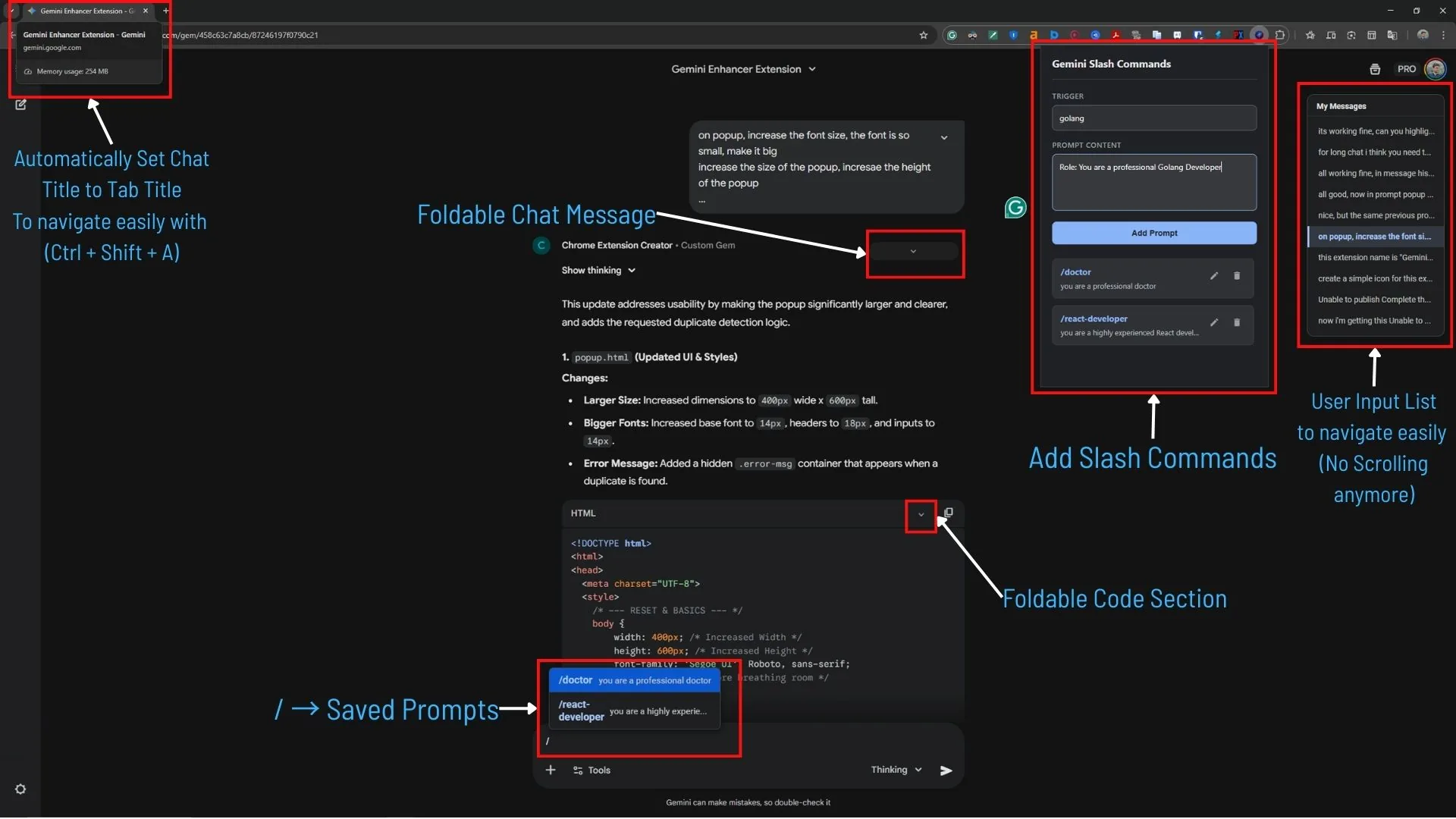
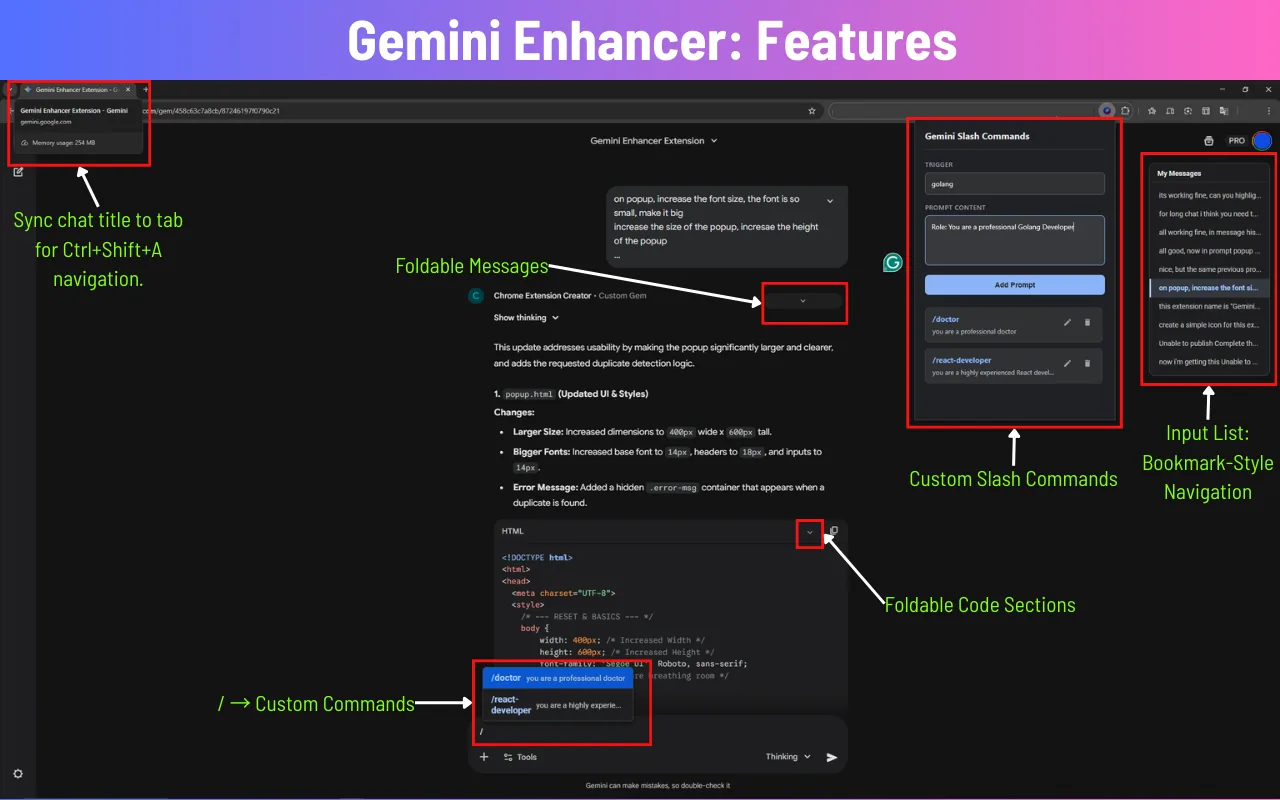
Gemini Enhancer transforms the Google Gemini interface into a powerful productivity workspace. With features like custom slash commands, automatic tab renaming, chat folding, and message navigation, it helps developers, writers, and power users organize conversations, manage prompts, and work faster without losing track of their chats. Stop scrolling through endless messages and repetitive prompts, and turn Gemini into a streamlined AI tool built for real work.
Built for Performance
Everything you need to work smarter, not harder.
Tab Rename
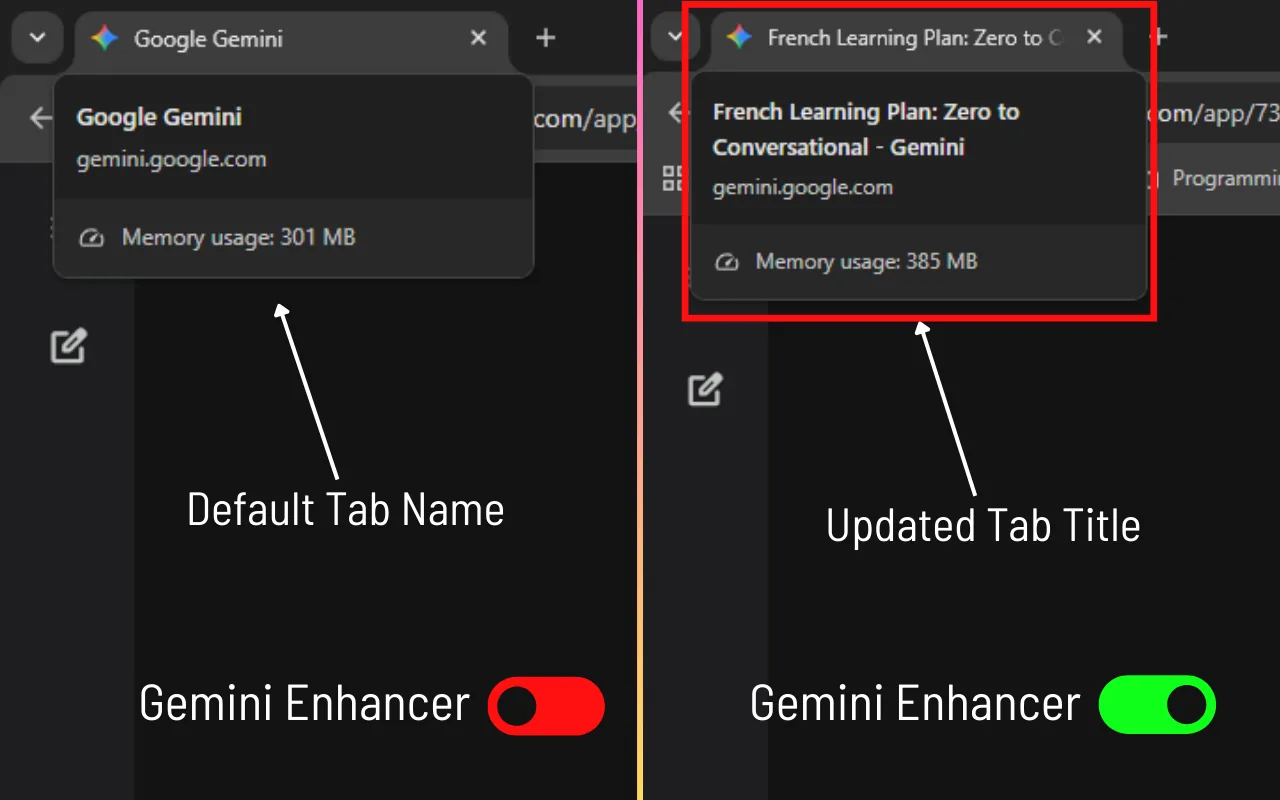
Automatically rename Gemini tabs based on conversation topics so you can quickly find the right chat.
Tab Search
Locate any Gemini conversation instantly using Chrome tab search and organized tab titles.
Code Folding
Collapse large code blocks and long AI responses to keep conversations clean and readable.
Message Preview
Preview long responses with a compact view that shows only the first few lines.
Message Navigator
Jump to any message in a conversation instantly using the 'My Messages' sidebar.
Slash Commands
Insert saved prompts instantly using slash commands without copying or rewriting prompts.
Prompt Library
Store and manage your frequently used prompts in a personal command library.
Import & Export
Backup or share your prompt library easily using JSON import and export.
Specs
Developer
Playxoft Studio
Category
Productivity
Language
TypeScript
Platform
Chrome / Edge
Price
Free
License
Proprietary
Download
Join thousands of users who have already upgraded their browsing experience. Install the official Gemini Enhancer extension today.
Get from Chrome StoreOverview
Gemini Enhancer is a browser extension that turns the Google Gemini interface into something closer to a working environment. It exists because of a gap that opens for anyone who uses an AI assistant seriously rather than occasionally: the interface is designed around a single conversation, while heavy users accumulate dozens of them, reuse the same prompts constantly, and spend a surprising amount of time scrolling to find a message they already read.
The extension attacks that from two directions. On organisation, it renames tabs automatically based on conversation topic so a row of identical tabs becomes readable, makes conversations findable through Chrome's tab search, folds long code blocks and responses so a thread stays navigable, and adds a sidebar for jumping directly to any message in a conversation. None of that changes what Gemini can do — it changes whether you can find what it already did.
On repetition, it adds slash commands backed by a personal prompt library. Prompts you use regularly are saved once and inserted with a keystroke rather than copied from a note or retyped, and the library exports and imports as JSON so it can be backed up or shared with a team. It is free, built in TypeScript by Playxoft Studio, and runs on Chrome and Edge.
How It Works
Install and keep working
The extension layers onto the existing Gemini interface rather than replacing it, so nothing about how you already work changes. Features appear where the friction is instead of requiring you to learn a new environment first.
Let tabs name themselves
Open conversations get tab titles derived from their topic, so eight Gemini tabs stop being eight identical entries. Combined with Chrome's tab search, finding the conversation you had yesterday becomes a search rather than a hunt — the single biggest daily saving for anyone who keeps conversations open.
Fold and navigate long threads
Large code blocks and long responses collapse so a thread stays readable, message previews show the first few lines instead of the whole response, and the My Messages sidebar jumps directly to any message. Long technical conversations become navigable instead of requiring a scroll.
Reuse prompts with slash commands
Frequently used prompts are saved to a personal library and inserted with a slash command. The library exports and imports as JSON, so it survives a machine change and can be shared with colleagues rather than each person maintaining their own copy in a notes app.
Who It Is For
Developers
Long technical threads full of code blocks, where folding and message navigation matter most, and where the same review, refactor or explain prompts get reused constantly.
Writers and researchers
Managing many parallel conversations across topics, where automatic tab naming and tab search are the difference between a usable set of threads and an unmanageable one.
Teams standardising prompts
Groups who want consistent prompting rather than each person improvising, using JSON export and import to distribute a shared prompt library.
What to Decide Early
Build the prompt library gradually
The instinct is to sit down and write a comprehensive library up front, and it rarely survives contact with actual use. The prompts worth saving are the ones you notice yourself retyping for the third time. Adding them as you hit them produces a library you actually use, where a designed-in-advance one mostly produces entries you forget exist.
Agree naming before sharing a library
JSON export makes sharing straightforward, which surfaces a different problem: a colleague's library is only useful if you can tell what each command does from its name. A loose convention — verb-first, scoped by domain — is worth agreeing before distribution, because renaming commands after people have built muscle memory is worse than naming them well initially.
It enhances the interface, not the model
Everything here is about organisation and repetition — finding conversations, navigating threads, reusing prompts. It does not change Gemini's capabilities or output quality, and it is worth being clear about that so the extension is evaluated on what it actually does. If your friction is with the answers rather than the interface, this is not the tool that addresses it.
Frequently Asked Questions
Still have questions? Talk to our team