Xecret
Stop shipping secrets in .env files
Open-source secret management — encrypted environment variables per stage, injected into your process with one command. No .env files on disk.
About Xecret
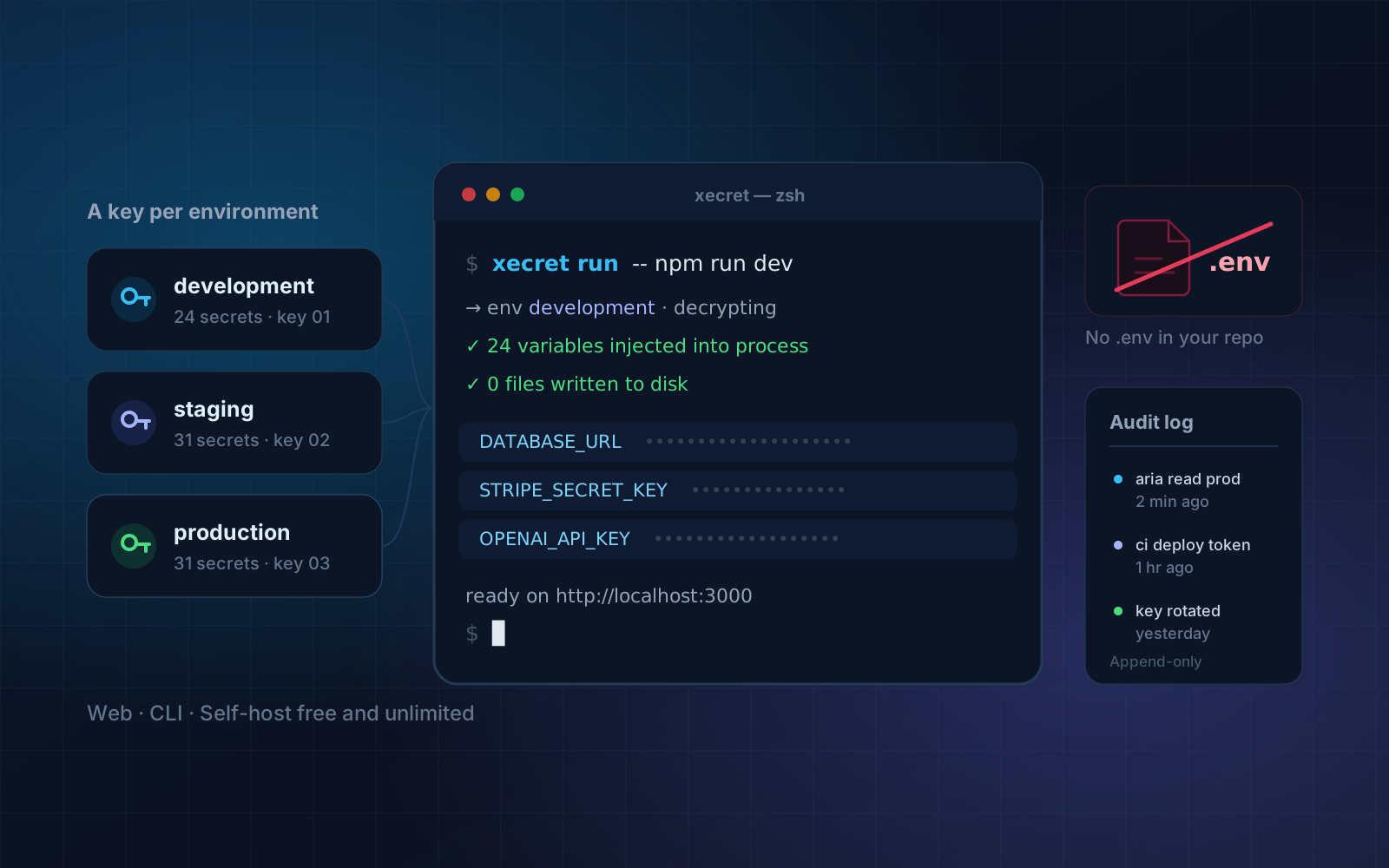
Xecret replaces the .env file that gets copy-pasted into Slack. Secrets are stored once, encrypted, and scoped per environment — development, staging and production each get their own key. Instead of writing a file to disk, the CLI decrypts and injects the variables directly into your process: `xecret run -- npm run dev`.
The same command works across Next.js, Node, Vite, Go, Docker and CI/CD pipelines with no code changes. Every read is written to an append-only audit log, member and role permissions revoke instantly, and an encrypted local cache keeps builds running when the network does not. The server is AGPL-3.0 and the CLI is MIT, so teams that would rather own the whole stack can self-host it free and unlimited.
Project Details
- Category
- DevTools / Secret Management
- Interface
- CLI + Web dashboard
- Compute
- Cloudflare Workers
- Database
- Neon / Postgres
- Encryption
- Envelope, key per environment
- License
- AGPL-3.0 server, MIT CLI
What Xecret does best
A Key Per Environment
Development, staging and production each hold their own encryption key — a leak in one never reaches the others.
One Command, Any Stack
`xecret run` injects secrets into Next.js, Node, Vite, Go, Docker and CI with zero code changes.
Append-Only Audit Log
An immutable record of who read which secret and when — ready for a security review.
Instant Revocation
Member and role-based access control where removing someone takes effect immediately, not at the next deploy.
Works Offline
An encrypted local cache keeps your dev loop and your builds alive through network outages.
Self-Host It Free
Runs on Cloudflare Workers with Postgres or Neon — a single static binary, no runtime dependencies.
Overview
Xecret is a secret management tool that replaces the .env file which gets copy-pasted into Slack. Almost every team has the same story: a new developer joins, someone pastes the development environment file into a direct message, and that file now exists in a chat history nobody can audit, on a laptop nobody tracks, and in a backup nobody remembers. The fix is not better discipline, it is removing the file.
Secrets are stored once, encrypted, and scoped per environment — development, staging and production each hold their own key, so a leak in one never reaches the others. Rather than writing a file to disk, the CLI decrypts and injects variables directly into the process you are running. One command covers Next.js, Node, Vite, Go, Docker and CI/CD pipelines with no code changes, because the application still just reads environment variables.
The operational features are what make it usable beyond a single developer. Every read is written to an append-only audit log, so the question of who accessed which secret and when has an answer ready for a security review. Member and role permissions revoke immediately rather than at the next deploy. An encrypted local cache keeps your dev loop and your builds working through a network outage. The server is AGPL-3.0 and the CLI is MIT, so self-hosting is free and unlimited.
How It Works
Create a project and its environments
A project holds environments, and each environment holds its own encryption key. That separation is the core security property: production secrets are not merely filtered out of a development view, they are encrypted under a different key that a development token cannot use.
Import what you already have
Existing .env files are imported once, per environment, and then deleted from disk. This is usually the moment teams discover how many copies were in circulation — the import is straightforward, the cleanup of stale copies is the part worth planning.
Run through the CLI
Instead of loading a file, prefix the command you already run. The CLI authenticates, fetches and decrypts the environment, and injects the variables into the child process. Nothing is written to disk, so there is no file to accidentally commit, copy or back up.
Audit and revoke
Every read appends to an immutable log. When someone leaves the team or a token is suspected of being compromised, revoking access takes effect on the next fetch rather than requiring a redeploy, and the log shows exactly what that identity had accessed beforehand.
Common Use Cases
Team onboarding and offboarding
Granting a new developer working access without sending them anything, and removing that access completely when they leave — including the historical record of what they could reach.
CI/CD pipelines
Build and deploy jobs that need production credentials without those credentials being stored in the CI provider, where they are typically visible to anyone who can edit a workflow file.
Regulated and audited environments
Teams that must answer who accessed which credential and when. The append-only log is designed for that question specifically, rather than being general application logging that happens to include it.
What to Decide Early
Decide your environment boundaries first
Development, staging and production is the obvious split, but real teams often need more — a shared preview environment, a per-developer sandbox, a separate region. Because each environment is a separate key and a separate permission surface, adding one later is easy while merging two is not. Map the environments you actually deploy to before importing anything.
Plan the cleanup, not just the import
Importing existing secrets takes minutes. The work that actually improves your security posture is finding and deleting the copies already scattered across laptops, chat histories, CI settings and backups, and rotating anything that was exposed in a place you cannot clean. A migration that imports without rotating has moved the secrets without reducing the risk.
Choose hosted or self-hosted against your threat model
Self-hosting is free and unlimited, runs on Cloudflare Workers with Postgres or Neon, and ships as a single static binary. The hosted service removes that operational work at $9 per member per month. The right answer depends on whether your compliance position permits a third party to hold encrypted secrets at all — a question worth settling before the tool is embedded in every pipeline you run.
Frequently Asked Questions
Still have questions? Talk to our team
Need A Custom Solution?
Tailored To Your Exact Needs