How Much Does It Cost to Add AI to Your Existing Software?

The request often lands in a deceptively small sentence: “Can we add AI to the product?” A team has a working customer portal, an internal operations tool, or a mature SaaS platform. Someone has seen a useful assistant elsewhere. The first discussion focuses on the model, a chat window, and a quick demo.
That is how many AI integration cost conversations begin. It is also why they go wrong. The visible feature is only one part of the budget. You are paying once to make the feature trustworthy inside your product, then paying repeatedly every time it reads, reasons, retrieves, or generates something for a user.
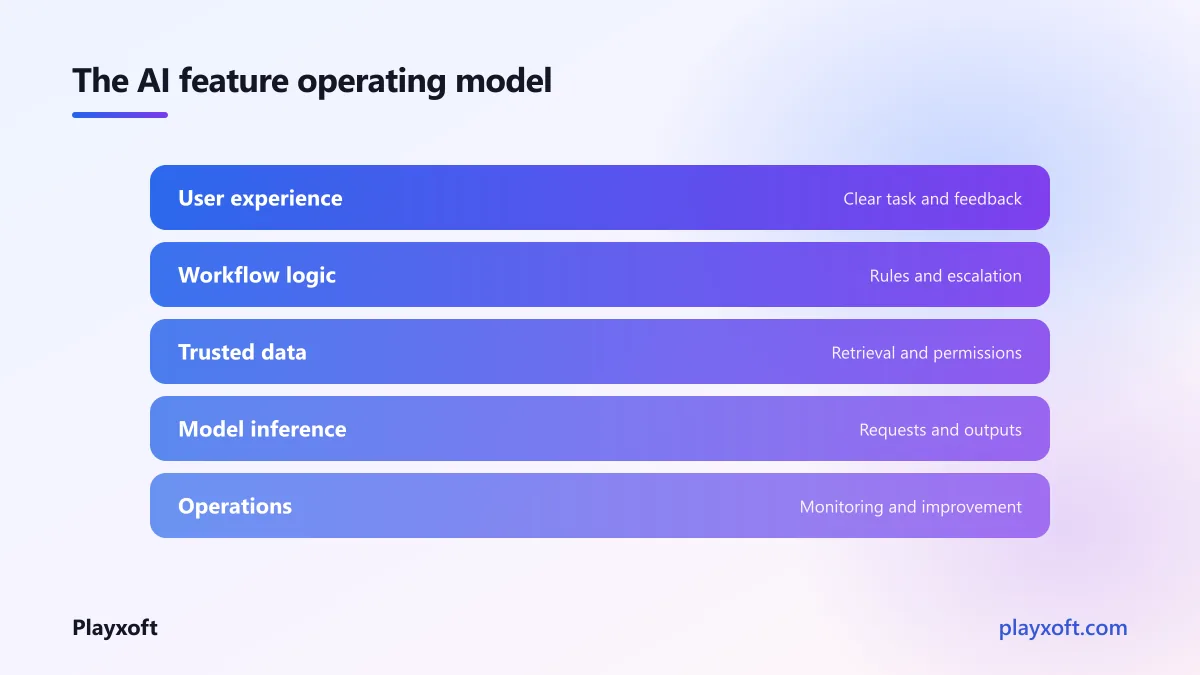
My view is simple: an AI feature should be treated as a small product with an operating model, not as a clever API call. The companies that make this distinction early tend to ship features they can support. The ones that do not can produce an impressive prototype and inherit a costly, unpredictable service.
The AI integration cost has two clocks
Every useful estimate needs two separate answers. The first is the one-time build cost: discovery, product design, integration, data preparation, testing, security work, and release. The second is recurring inference cost: the ongoing spend for model requests, document processing, retrieval, monitoring, and the infrastructure around them.
Buyers naturally ask about the first clock because it appears in the project proposal. The second clock is less visible because it starts after launch and varies with real behaviour. A feature can be inexpensive to demonstrate with a few test prompts, then become expensive when hundreds of people use it against long conversations, large files, or open-ended workflows.
The right question is not “What does the model cost?” It is “What does one useful outcome require?” For a support answer, that could include a user question, several retrieved knowledge-base passages, instructions, a generated answer, and a record for review. For an extracted invoice, it can include page rendering, image quality checks, structured output, exception handling, and a human correction path.
That is also why model pricing pages are only inputs to planning, not the plan itself. OpenAI's API pricing documentation explains how usage is charged, while your product decisions determine how much usage each outcome creates.
One-time work makes the feature belong in your product
The build budget is mostly about reducing uncertainty and making the result usable. It commonly covers:
- defining the job the feature will do and the cases it must refuse
- connecting it safely to your existing identity, permissions, data, and workflows
- preparing source content so retrieval returns relevant, current material
- designing the interface for confidence, correction, and escalation
- evaluating outputs with realistic examples rather than a few hand-picked prompts
- logging, monitoring, and release controls so the team can improve it after launch
The AI component is rarely the hardest part. The harder question is whether the feature has the right information, enough guardrails, and a clear action when it is uncertain. This is product work and engineering work at the same time.
Recurring inference is an operating decision
Inference cost changes with volume, prompt length, output length, retrieval choices, model selection, and retries. It also changes when a product invites people to experiment. A button labelled “Ask anything” creates a different cost profile from a guided flow that requests one short, well-defined task.
For most small and mid-size products, Playxoft sees recurring AI inference costs of $30 to $400 per month. Heavy document or chat volume can reach $1,000 to $3,000 per month. Those ranges are not a licence to postpone planning; they are a reason to define the likely unit of use before launch.
Infrastructure belongs in that conversation too. An early SaaS product typically needs $50 to $300 per month in infrastructure, growing to $300 to $1,500 as traffic and data grow. Support and maintenance retainers can run from $500 to $2,500 per month depending on scope. The feature is not “done” when it can produce an answer. It needs observability, a way to revise its knowledge, and someone accountable for exceptions.
Three common shapes, three different budgets
Most requests fit one of three patterns. The labels matter less than the operating behaviour behind them: how much context the system needs, how often it runs, and whether it can take action.
A support assistant: $2,500 to $7,000 to build
A support assistant grounded in your content is often the best first AI feature because its job can be bounded. It helps a customer find a policy, understand a product setting, or decide whether to contact a human. The one-time build range is $2,500 to $7,000.
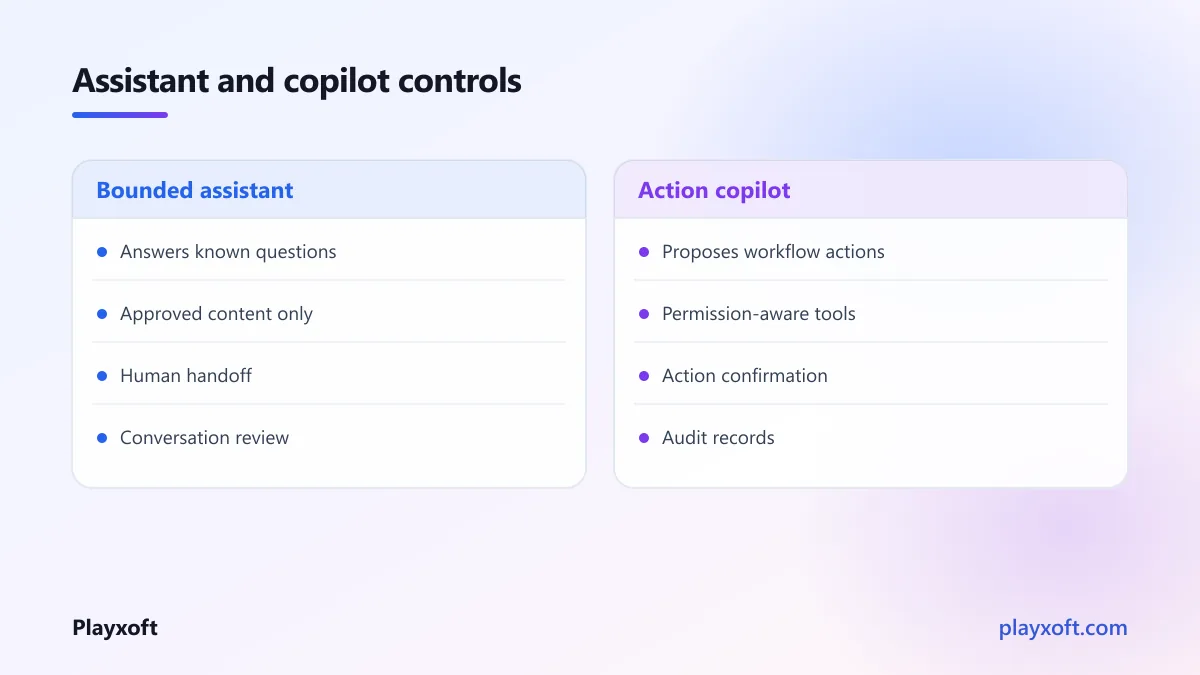
The budget rises when the knowledge lives in many places, the product has different customer tiers, or answers must respect permissions. A serious assistant needs retrieval from approved content, source-aware responses, a handoff route, and feedback from support staff. It should not confidently invent an answer just because a chat box is present.
Its recurring spend is driven by conversation volume and context size. Sending an entire help centre with every question is an architectural shortcut that can quietly turn each interaction into a larger bill. Curated retrieval, concise system instructions, and sensible limits are usually better for both quality and cost.
A document extractor: $4,000 to $12,000 to build
Document or invoice extraction is a different business case. The value comes from turning inconsistent files into structured fields that a workflow can use. Playxoft's one-time range for this pipeline is $4,000 to $12,000.
The expense is not only the extraction model. Teams need to define document classes, handle low-quality scans, validate fields, manage duplicates, route exceptions, and show a person what the system found. If an extracted total drives a payment, approval, or record, the correction loop is part of the feature—not an optional extra.
This shape can create a sharp recurring curve. A low volume of clean documents may remain modest. Large files, repeated processing, many pages, or an expanding archive can push usage quickly toward the higher recurring range. Establish a policy for what is processed, how long files are retained, and when a document should be rejected before it reaches the model.
An in-app copilot: $8,000 to $25,000 to build
An in-app copilot with tool access sits at the other end of the range: $8,000 to $25,000 as a one-time build. It does more than answer questions. It can understand the current work, propose a next step, and call permitted tools in the product.
That makes it valuable, but it also raises the standard. The copilot must know which data a user can see, which actions they can approve, what confirmation is required, and how to recover from a failed action. Tool access turns a language feature into an authority design problem.
OWASP's guidance on large language model application risks is useful here: prompts, external data, and tool calls all need to be treated as potential paths to unintended behaviour. A copilot should have narrow permissions, visible actions, confirmation for meaningful changes, and audit records. Those choices add build work, but they prevent much more expensive ambiguity later.
If you would like a hand sizing the right first release, talk with our product team. A short scoping conversation can separate the useful workflow from the attractive but costly extras.
Why a cheap prototype becomes an expensive product
A prototype is meant to prove that a model can produce something plausible. It often uses a small sample of data, a single happy path, one person testing, and no real operational limits. That is appropriate for learning. It becomes a problem only when the prototype is mistaken for the product plan.
Four transitions usually expose the gap:
- From sample data to live data. Real content is incomplete, stale, duplicated, and permissioned. Cleaning the data path is work.
- From a prompt to a workflow. Users need context, choices, error states, and a place to correct the result.
- From a demo user to many users. Higher volume amplifies retries, long prompts, attachment processing, and support needs.
- From suggestions to actions. The moment a feature can send, change, approve, or delete, permissions and confirmation become core product requirements.
There is a useful commercial test: would the feature still be worthwhile if every completed task had a visible operating cost? If the answer is unclear, the team should instrument usage and narrow the task before broadening access. Cost controls work best when they are product choices, not emergency limits added after a surprising invoice.
The NIST AI Risk Management Framework offers a practical reminder that governance is not a separate compliance exercise. For a product team, it means deciding what success looks like, measuring failures, documenting ownership, and responding when the system behaves outside its intended role.
How to budget before you choose a model
Start with a short discovery phase, not a vendor comparison. Describe the user, the trigger, the input, the expected output, and the consequence of being wrong. Then build a thin release around the smallest valuable workflow.
For each candidate feature, ask:
- What information must be retrieved or processed for one outcome?
- How often will each user invoke it in normal work?
- Which inputs can be capped, summarised, or excluded?
- What happens when confidence is low or a tool call fails?
- Who reviews usage, quality, and recurring spend after release?
This creates a budget with two lines from the start: delivery cost and monthly operating cost. It also makes trade-offs visible. A faster model may be sufficient for a classification task. A larger model may be reserved for rare, complex cases. A human review queue may be cheaper and safer than trying to automate every exception.
Playxoft's published ranges sit well below typical North American and Western European agency pricing because our team structure is efficient, not because we cut engineering corners; after a short scoping call, we provide a firm number for the agreed scope.
The AI integration cost worth paying is the one you can operate
AI integration cost is not a single number attached to a chat feature. It is the combination of a deliberate build, a measured monthly service, and the decisions that keep both aligned with user value.
The strongest starting point is usually not the most ambitious copilot. It is a contained workflow where the input is known, the outcome is useful, and success can be measured. Prove that unit, watch its running cost, then earn the right to widen the feature.
If you want an AI feature that improves the product without becoming an uncontrolled expense, book a free consultation call with Playxoft or write to info@playxoft.com. We will help you scope the build, forecast the recurring inference cost, and choose a first release your team can confidently operate.