How to Migrate a Legacy System Without Breaking Your Business

The most expensive migration we have been called in to repair went live on a Saturday night. The plan was to switch everything at once, verify on Sunday, and open for business Monday morning.
By Monday afternoon they were running the old system again, four days of data reconciliation ahead of them, and a lot of difficult conversations with customers.
The plan was not incompetent. It was just structured so that the first moment anyone would learn whether it worked was also the moment it had to work. That is the defining property of a bad legacy system migration, and it is entirely avoidable.
The alternative takes longer on paper and is dramatically safer in practice: move in small pieces, each independently reversible, with the business running throughout.
Phase one: find out what you actually have
Before moving anything, you need an inventory. This is tedious and it is where most of the risk hides.
Every consumer of the system. Not just your main application. The nightly report someone built four years ago, the finance team's spreadsheet that pulls from the database directly, the partner integration nobody documented, the internal tool that only one department uses. Each of these will break, and each will surface at the worst moment if you do not find it first.
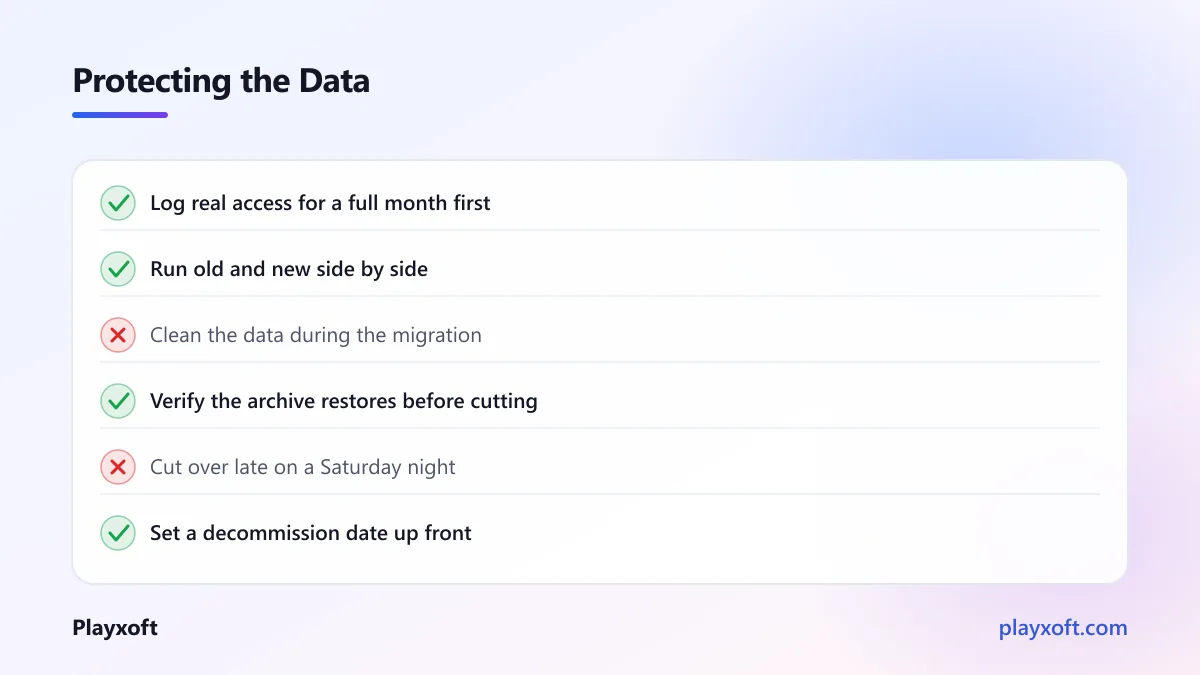
The reliable way to find them is to log actual access at the database and API level for a few weeks. A full month is better, because monthly processes exist and will otherwise be missed entirely.
Every business rule the system enforces. Legacy systems accumulate logic in unexpected places: database triggers, stored procedures, scheduled jobs, constraints, and application code. A rule you do not know about is a rule your new system will not reproduce.
The data's real shape, not its documented shape. Old systems always contain surprises — columns repurposed for a different meaning, nulls where the schema says there should not be, dates stored in three formats because the convention changed twice. Profile the actual data before designing anything that consumes it.
Phase two: put a facade in front
This single step makes everything afterwards possible.
Instead of consumers talking directly to the old system, they talk to an interface you control, which passes requests through. Nothing changes functionally. Nothing moves yet. You have simply gained a switch point.
Once the facade exists, you can redirect any individual operation to a new implementation without the consumers knowing or caring. That is the whole trick, and it is why this approach is called the strangler pattern — Martin Fowler's description of the strangler fig application covers the reasoning well.
Introduce the facade while everything still points at the old system, and let it run for a week or two. If it causes problems, you find out while the change is trivially reversible.
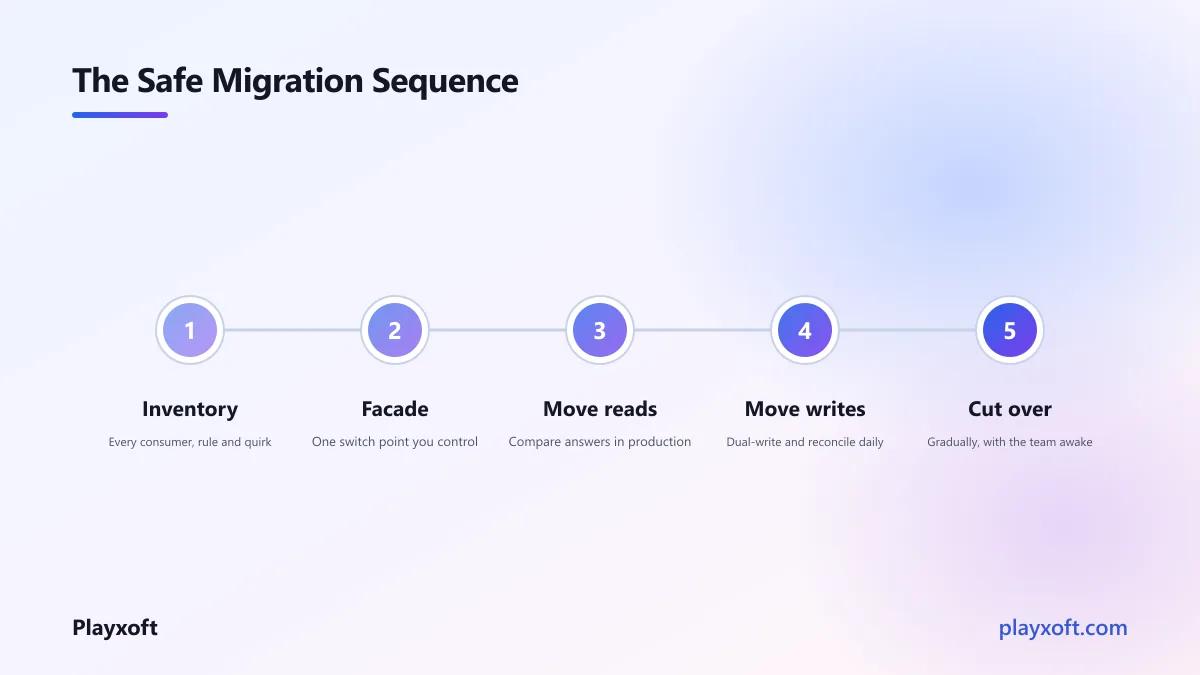
Phase three: move the reads first
Reads before writes, always. A read that returns the wrong answer is a bug. A write that goes to the wrong place is lost data.
Pick one read operation, implement it against the new system, and serve it from there. Start with something low-stakes and well-understood, not your most critical query.
The technique that makes this safe is running both and comparing. Serve the answer from the old system, but also call the new one, compare the results, and log any difference without showing it to the user. You get real production traffic exercising the new implementation with zero risk.
Let this run until the differences stop, and investigate every one. In our experience, the differences you find here are the single most valuable output of the entire migration, because each represents a business rule you did not know existed.
Phase four: move the writes, carefully
Writes are where genuine risk lives, and they deserve a slower pace.
Dual-write means writing to both systems for a period. The old system remains authoritative; the new one accumulates the same data. This lets you verify that the new system's state matches, over real usage, before trusting it.
The complication nobody warns you about: dual-writes can partially fail. The write to the old system succeeds, the write to the new one fails, and now they disagree. You need to decide in advance which system wins, and you need a reconciliation job that finds and reports divergence continuously.
Verify constantly. Run an automated comparison of the two datasets on a schedule. Count records, compare checksums of key fields, and alert on any drift. Do not rely on spot checks — the discrepancies that hurt are the ones in records nobody looks at.
If your systems span more than one database, be realistic about what a distributed write can guarantee. The saga pattern — a sequence of local transactions with explicit compensating actions when a step fails — is the usual honest answer, and it is considerably easier to design in at this stage than to retrofit after a partial failure has already scrambled your data.
Only when reconciliation has been clean for a sustained period, under normal and peak load, do you flip authority to the new system.
If this sounds like more work than a clean switch
It is more work, and it is less risk, and for anything the business depends on that trade is almost always correct.
If you are planning a migration and want a second opinion on the sequencing before committing — particularly on which pieces to move first — we are happy to work through it with you.
Phase five: cut over without an audience
If the previous phases were done properly, cutover is anticlimactic. That is the goal.
By this point the new system has been serving reads for weeks and receiving writes in parallel. Cutover is a configuration change that makes it authoritative. If something is wrong, you change the configuration back.
A few things that make it calmer:
Do it gradually where you can. Route a small percentage of traffic first, watch, then increase. A problem affecting two percent of users is an incident; one affecting all of them is a crisis.
Keep the old system running, untouched, for a defined period. Not as a fallback you hope never to use, but as a deliberate safety net with a stated end date. A month is typical.
Do it on a Tuesday morning. The Saturday-night deployment exists so that failures are less visible, which is precisely backwards. Deploy when your whole team is awake, rested, and available.
Phase six: decommission deliberately
The step everyone skips, and it costs real money.
Organisations routinely keep legacy systems running for years after migration, paying for licences and infrastructure, because nobody is quite confident enough to turn them off.
Do it properly: set a date at the start, confirm nothing has accessed the old system for the agreed period by checking your access logs, take a final archived export and verify it can be restored, then switch it off. Keep the archive as long as your retention obligations require.
If you find you cannot turn it off because something still depends on it, that dependency is exactly what your phase-one inventory was supposed to find. Better to discover it now than during an audit.
What to do about the data itself
Two decisions worth making explicitly.
Do you migrate history, or only what is live? Full history is expensive and often unnecessary. A common and sensible compromise: migrate recent and active data into the new system, and keep historical records in a read-only archive that reporting can reach. Ask what the business genuinely needs to query, rather than assuming everything.
Do you clean the data, or move it as-is? Migration is a tempting moment to fix years of accumulated mess, and that temptation has sunk many projects. Cleaning changes data while you are also changing systems, which means when something looks wrong you cannot tell which change caused it.
Our recommendation: move it faithfully, warts included, then clean afterwards as a separate exercise with its own verification. One variable at a time.
What tends to go wrong
From the migrations we have been part of or repaired:
- A consumer nobody knew about broke silently, and was noticed weeks later
- A business rule lived in a database trigger and was not reproduced
- Dual-writes diverged quietly because nobody checked reconciliation reports
- The old system was decommissioned before the archive was verified restorable
- Data was cleaned during migration, making every discrepancy ambiguous
- Cutover happened at a quiet hour when the team best placed to fix things was asleep
Every one of these is preventable by the phases above, which is why the sequence matters more than the technology.
Boring is the goal
A successful legacy system migration produces no story. Nobody outside the team notices it happened. There is no heroic weekend, no war room, no reconciliation marathon.
That outcome comes from a structure where every step is small, verified against real traffic, and reversible on its own. It takes longer than a single cutover, and it is the difference between a project people remember fondly and one they remember as the worst month of the year.
If you are facing a migration and want a partner who will sequence it so the business keeps running throughout, book a free consultation call or email info@playxoft.com. We will start with the inventory, because that is where the surprises are.